
Blog
All modes in CS2: Premier, Competitive, Duo, and others.
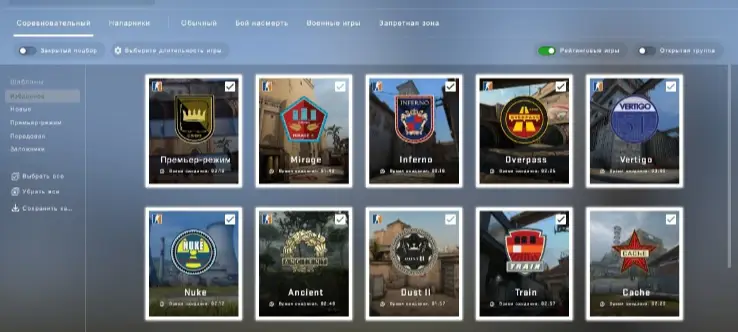
Counter-Strike 2 offers several modes: from 5‑on‑5 ranked matches to short 2‑on‑2 games, quick warm‑ups, and scenarios with an already planted bomb. They differ in team size, number of rounds, map selection, rating system, and players’ objectives.
As of September 2026, seven main modes are available in Valve’s official selection: Premier, Competitive, Wingman, Casual, Deathmatch, Arms Race, and Retakes. You can separately launch training with bots, workshop maps, private matches, and community servers.
In this article, we’ll look at all the current modes in CS2, compare their rules and duration, explain the differences between Premier and competitive mode, and suggest where a beginner should start.
Contents
- What modes are available in CS2
- Comparison of CS2 modes
- Premier mode
- Competitive mode
- Teammates
- Casual mode
- Deathmatch
- Arms Race
- Clear
- Training, workshop, and private matches
- Modes on community servers
- Which modes from CS:GO are not available in CS2
- Prime, experience, ranks, and weekly rewards
- Which mode to choose
- FAQ
What modes are available in CS2
The game mode in CS2 determines the objective of the match and its main rules: the number of participants, the number of rounds, the available weapons, the economy, the possibility of respawning, and the way to determine the winner.
Premier and Competitive use the classic Counter‑Strike framework: terrorists play against special forces, buy weapons and grenades, have one life per round, and complete the map objective. In other modes, some of these rules are changed or completely disabled.
All game variants can be divided into three groups:
- official Valve selection - Premier, Competitive, Wingman, Casual, Deathmatch, Arms Race and Retakes;
- local and private play - training with bots, closed lobby and maps from the Steam Workshop;
- community servers - custom maps, plugins and modes Surf, KZ, Bhop, Zombie, Jailbreak, Arena and others.
Not every tab in the menu is a separate mode. For example, “Training” determines how the map is launched, and specific rules can be changed via settings and console commands. A map from the workshop can also be training, competitive, or completely custom.
How to enable or change the mode
Open CS2, click “Play” and select the desired tab. For Premier, Competitive, and Wingman, you will then need to start a match search. In Competitive, you can mark the maps in advance, while in Premier, the map is determined via a vote before the game starts.
For a local game, select a training session or a workshop map. Non‑standard modes are launched via the community server browser. The set of available maps and individual menu tiles may change after Valve updates.
Comparison of all CS2 modes
Below are the main differences between the official modes. The duration is approximate: it depends on the score, the pace of the rounds, and the time spent searching for players.
Premier — a 5v5 format using the MR12 system. The match usually takes 30–50 minutes, affects the overall CS Rating, and is suitable for main ranked play;
Competitive — a 5v5 format using the MR12 system. The match lasts approximately 25–45 minutes, and the result affects the individual rank of the selected map;
Wingman — a short 2v2 match using the MR8 system. Usually takes 10–20 minutes and has its own rank;
Casual — a regular game with teams of up to 10 people. The match lasts about 15–30 minutes and does not affect the rating;
Deathmatch — a ten‑minute all‑against‑all fight. Suitable for warming up and shooting practice;
Arms Race — a dynamic mode with sequential weapon changes. The match usually lasts 5–15 minutes;
Retakes — a 4v3 scenario with an already planted bomb. The match takes about 10–20 minutes and is suitable for practicing retakes and post‑plant plays.
CS Rating changes only in Premier. Competitive results affect the rank of the selected map, and Wingman matches affect the separate rank of the “Partners” mode. Casual, Deathmatch, Arms Race, and Retakes do not increase or decrease the competitive rating.
Premier mode in CS2 (Premier)
Premier mode in CS2 is Valve’s main ranked queue and the format of official matchmaking that is closest to tournament play. Two teams of five players conduct a veto: they take turns eliminating cards from Active Duty, after which the remaining card and starting side are determined.
In Premier, you cannot pre‑select only Mirage, Dust II, or another favorite map. Therefore, it is advisable for a player to know the main positions, timings, and grenades across several locations at once.
The match follows the MR12 system. After 12 rounds, the teams switch sides, and to win in regular time, a player needs to score 13 rounds. When the score is 12:12, overtime begins, consisting of six additional rounds — three for each side. If the score becomes 15:15 after it, the official Premier match ends in a draw.
In Season 5, which started in July 2026, Active Duty includes:
- Ancient;
- Anubis;
- Cache;
- Dust II;
- Inferno;
- Mirage;
- Nuke.
Cache has replaced Overpass. The Active Duty lineup changes between seasons, so before the start of a new season, it’s worth checking the current map pool directly in the game.
Instead of the classic rank, Premier uses a numerical CS Rating. It reflects the player’s position in the rating system and allows them to participate in regional and global leaderboards. Before a match, the interface shows the expected rating change for a win and a loss.
To access Premier, you need Prime Status and a level 10 profile. After unlocking the mode, you need to achieve ten victories to get your first CS Rating. At the start of a new season, the rating undergoes recalibration.
- Format: 5v5, MR12;
- Map selection: ban from Active Duty maps;
- Rating system: a single seasonal CS Rating;
- Overtime: six additional rounds when the score is 12:12;
- Suitable: